Solve routes
Connect selected boards, glyph sockets, and target tiles with fewer points.
StartPathGlyphTarget
Diablo IV Paragon route planning
Season 15 · Patch 3.2.1 · DiabloTools/d4data
Paragon Forge is a Diablo 4 Paragon Board solver. Choose boards, glyphs, and target tiles; it connects them, compares saved Runs, and moves compatible plans through Import and Export.
Start PlanningIn the planner
Focused solver
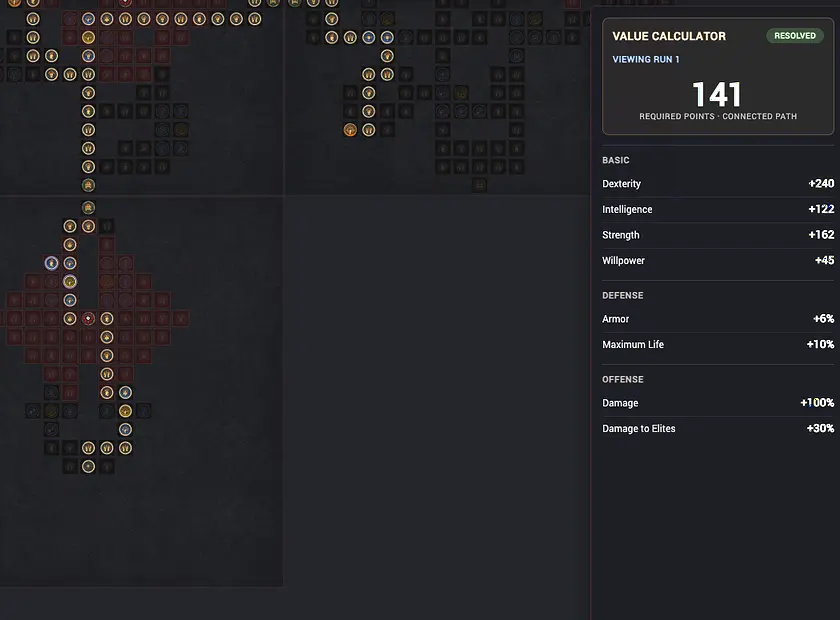
Select the tiles and glyph effects your build needs. The solver connects those requirements, reports the selected-point cost, and records each result as a Run you can inspect or compare.
Connect selected boards, glyph sockets, and target tiles with fewer points.
Evaluate point cost and value differences between saved Runs.
Import Maxroll Paragon JSON or a public d4builds build URL, then export the active Run as JSON.
Two planning stages
The same route solver supports a fresh Paragon character and a finished leaderboard build. Start from the information you already have and keep every alternative as a separate Run.
Mark the build-defining Legendary and Rare tiles plus Glyph Sockets first. Resolve finds the lowest selected-point connection for your current board order. Best Order also searches board layouts and glyph placements when the sequence can change.
Open a leaderboard or build-guide setup in a compatible planner, then import its public link or Paragon JSON. Paragon Forge restores the purchased tiles, board layout, and glyph choices so you can reconnect the route and test alternatives.
Run comparison
Choose two saved Runs of the same class. Baseline A stays as the reference; Candidate B shows the exact cost and value changes created by a different route, board order, or glyph plan.
Interoperability
Import converts third-party Paragon data into a local Run. Export converts the active Run back into a selected planner format and copies the JSON to your clipboard.
Maxroll accepts the matching JSON workflow. d2core and D4Builds JSON exports remain available for backup and compatible tools; those sites do not accept pasted JSON. d2core import is temporarily unavailable.
Diablo 4 Paragon planner comparison
Choose by task: full character construction, community build discovery, Chinese game data, or focused Paragon route solving. Paragon Forge connects the selected Paragon targets after the broader build direction is known.
| Tool | Public focus | Best place in the workflow |
|---|---|---|
| Paragon Forge | Focused Paragon route solving with Resolve, Best Order, Run Comparison, and compatible Import/Export. | Use it when the required boards, tiles, or glyphs are known and point-efficient connections matter. |
| Maxroll | A full character planner covering equipment, aspects, affixes, skills, Paragon, and Renown progression. | Create the complete build, then bring its Paragon JSON into Paragon Forge to solve and compare routes. |
| D4Builds | A full build planner with gear, skills, Paragon, mercenaries, War Plans, notes, sharing, and saved builds. | Find or share a full build, then import its public URL to test the Paragon connection in Paragon Forge. |
| d2core | A Chinese build simulator and game-data site with classes, build variants, saving, likes, and collections. | Explore its Chinese builds and game data. Importing d2core links into Paragon Forge is temporarily unavailable. |
Reviewed against each public planner on August 5, 2026. Paragon Forge is the tool on this site; competitor names and trademarks belong to their owners.
Workflow
Paragon Boards by class